
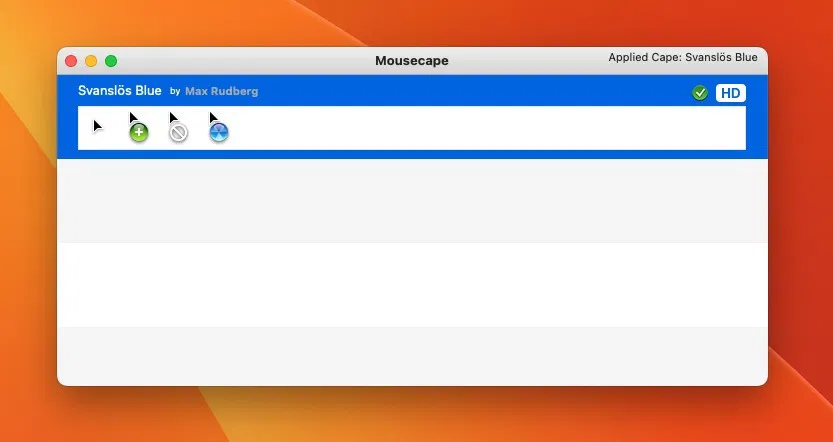
Mousecape stands as one of the most popular tools for macOS users looking to customize their cursor appearance. Originally developed to fill the gap for personalization on Mac systems, Mousecape offers a seamless way to enhance everyday computer interaction through creative cursor designs. Users often seek such tools not just for aesthetic preferences but also to improve visibility, productivity, and accessibility. Customizing the pointer can make work on macOS more personal and visually engaging.
macOS users have a longstanding tradition of seeking customization options despite Apple’s restrictive ecosystem. The ability to change icons, wallpapers, and now cursors contributes to a personalized workflow. Mousecape gives Mac users a rare opportunity to express individuality through cursor customization.
Verifying whether Mousecape works on the latest macOS versions becomes essential due to frequent macOS updates. Each update can introduce new security features or restrictions that affect third-party applications like Mousecape. Without compatibility confirmation, users may hesitate to install the app, worrying it could malfunction or pose security risks.
This guide explains Mousecape, explores macOS update challenges, confirms compatibility with the latest versions like macOS Sonoma or Sequoia, and provides detailed installation steps. Real user feedback and future expectations surrounding Mousecape will also be covered to provide a complete resource for potential users.
What is Mousecape?
History and Purpose Behind Mousecape
Mousecape began as a passion project by developers within the macOS customization community. Its creation aimed to solve the limited cursor customization options on macOS. While Windows users have enjoyed cursor flexibility for years, Mac users struggled until Mousecape provided a solution. Mousecape allows importing, creating, and sharing cursor “capes,” enabling users to replace the default macOS cursor with unique designs.
Enhancing macOS User Experience Through Mousecape
Mousecape delivers more than simple aesthetics. It enhances the user experience by providing greater control over the interface. Customized cursors can improve pointer visibility, assisting those with vision issues or those working in specific design environments. The visual customization contributes to mental clarity and focus during long working hours.
Users benefit from fresh designs, thematic cursors matching their workflow, or seasonal capes to keep their workspace engaging. Through these features, Mousecape becomes a utility for both functionality and enjoyment.
Key Features of Mousecape for macOS Users
Mousecape focuses on several core functionalities:
- Allows detailed cursor customization through easy-to-use .cape files
- Supports creation of custom cursor sets for specific tasks or personal preference
- Provides a community sharing feature, where users exchange creative designs
- Encourages user engagement through forums, repositories, and GitHub sharing
These features cater to developers, designers, accessibility users, and casual Mac enthusiasts alike.
The Challenge with macOS Updates: Compatibility Concerns for Mousecape
macOS Updates: A Constant Challenge for Developers
Apple’s macOS undergoes regular updates introducing significant changes to security, privacy, and UI frameworks. Each update tightens permissions, strengthens sandboxing, and enhances user data protection. While beneficial overall, these changes create hurdles for apps operating outside Apple’s strict app store environment. Mousecape frequently faces adjustments after updates due to these evolving standards.
Common Issues Mousecape Faces Post macOS Updates
Permissions management remains the most common obstacle. macOS regularly modifies how apps request access to system features such as Accessibility, essential for Mousecape’s operation. Without proper permissions, Mousecape cannot apply cursor changes system-wide. System restrictions may also block non-notarized software or disable unsigned changes, leading users to believe Mousecape is broken.
Sandboxing, another macOS security layer, can isolate apps from core system functions. This affects Mousecape’s ability to modify cursors across various applications and desktops, limiting its performance unless explicitly granted permissions.
User Concerns: Why Compatibility is Always a Question
With every macOS update announcement, Mousecape users turn to forums, GitHub, and Reddit to verify compatibility. Concerns center around app stability, potential bugs, and whether developers will continue support. Fear of incompatibility discourages new users from trying the app without clear guidance on its functionality under the latest OS.
Does Mousecape Work on the Latest macOS Versions? In-Depth Examination
Mousecape Compatibility with Latest macOS: Sonoma, Sequoia, and Beyond
Mousecape maintains compatibility with current macOS versions such as Sonoma and Sequoia. Developers ensure the tool remains operational through continuous updates available via GitHub or the official website. These updates reflect changes in macOS security and permissions models.
Mousecape’s architecture adapts quickly to Apple’s evolving ecosystem, providing users confidence that updates will not permanently break functionality. The community remains proactive in identifying issues and providing temporary workarounds.
Recent Adaptations and Development Activity
Mousecape developers maintain transparency through release notes on GitHub. Updates address changes required for macOS compliance, such as:
- Enhanced Accessibility permissions support
- Adjustments to work within System Integrity Protection (SIP) boundaries
- Compatibility fixes for new macOS UI changes
Community contributions supplement these updates, ensuring prompt fixes even before official releases. This ecosystem of support maintains Mousecape’s relevance despite frequent OS updates.
Minor Limitations Users Should Acknowledge
Despite ongoing compatibility, certain limitations persist:
- Users must manually grant permissions under System Preferences > Accessibility
- Cursor changes may occasionally reset after OS patches or reboots
- Some system apps may override custom cursors depending on security settings
These minor inconveniences rarely disrupt overall usage but remain important to understand before installation.
How to Install and Use Mousecape on Latest macOS: Step-by-Step Instructions
Downloading Mousecape for Latest macOS
Visit the official website or GitHub repository for the most current Mousecape version compatible with Sonoma or Sequoia. Ensure downloads originate from trusted sources to avoid security risks.
Installing Mousecape Safely
After downloading, open the application and move it to the Applications folder. If macOS blocks the app due to security policies, bypass this via:
- System Preferences > Security & Privacy > General
- Click Allow Anyway for Mousecape
Granting Accessibility Permissions
Navigate to System Preferences > Security & Privacy > Accessibility. Unlock changes using your admin password. Check the box next to Mousecape to grant necessary permissions for cursor modifications. Without this step, Mousecape cannot apply any cursor changes effectively.
Applying, Removing, and Resetting Capes on macOS
Open Mousecape and import desired .cape files via drag-and-drop or the import menu. Select a cape and click Apply Cape to activate the custom cursor.
To revert to default:
- Open Mousecape
- Select Remove Cape
- Restart affected applications if necessary
Resetting ensures no residual cursor changes linger post-removal.
Troubleshooting Common Installation Issues
- Ensure full disk access is granted if cursors fail to apply
- Restart Mousecape and macOS after permission adjustments
- Verify .cape file integrity before import
- Recheck accessibility settings after major OS updates
Following these steps guarantees smooth functionality on the latest systems.
User Feedback and Community Insights on Compatibility
Community Experiences with Latest macOS
The Mousecape user community remains active, frequently sharing compatibility experiences on forums like Reddit and GitHub. Most users report successful operation on macOS Sonoma and Sequoia when following setup instructions precisely.
Discussions highlight common pitfalls, including overlooked permissions or outdated capes causing issues. Users exchanging updated capes ensure a vibrant sharing ecosystem, maintaining Mousecape’s relevance.
Common Success Stories from Users
- Successful cursor customization after security permission adjustments
- Creative cursor sets enhancing productivity and visual appeal
- Seamless operation post-update with minor troubleshooting
Positive feedback reinforces Mousecape’s position as a reliable tool for cursor customization despite macOS’s tightening security measures.
Developer and Community Responsiveness
The developer actively monitors GitHub for issues, releasing fixes promptly. Community members frequently contribute solutions or custom guides, ensuring help is available beyond official channels.
This support ecosystem provides reassurance for new users and maintains confidence among long-term users relying on Mousecape.
Future Outlook for Mousecape and macOS Compatibility
Developer Roadmap for Ongoing Compatibility
Developers express commitment to updating Mousecape alongside future macOS versions. Planned improvements focus on streamlining permissions management and enhancing compatibility with evolving macOS frameworks.
The community expects Mousecape to adapt swiftly to each macOS release, given its track record of timely updates and active support.
Advice for Users Post-macOS Updates
- Delay macOS updates briefly to allow compatibility confirmations
- Monitor official Mousecape updates or community forums
- Reapply permissions settings after significant OS security patches
Following these practices minimizes downtime and ensures continued cursor customization without disruption.
The Future of Cursor Customization on macOS
As macOS evolves, cursor customization remains a niche yet valued area for personalization. Mousecape leads this space, setting expectations for similar future utilities while maintaining loyal user support.
Conclusion
Mousecape works smoothly with the latest macOS versions like Sonoma and Sequoia. It allows users to customize their Mac cursor with ease through simple installation and proper permissions. Active community support and regular updates ensure compatibility with future macOS changes. Mousecape remains a trusted choice for Mac users who want a more personalized, creative, and functional cursor experience without worrying about system restrictions or future macOS updates.